





The Ultimate Tactical Saga Reborn, 『Genesis War』
Greetings, this is GM Azidahaka.
In Genesis War, linking your account to the FLOOR platform allows
for more secure management of your account information and ensures a stable gaming experience.
This guide is designed to help you smoothly link your account to the FLOOR platform.
Please refer to the instructions below to proceed with the linking process.
[FLOOR Platform Linking Guide]
1. How to Link Your Current Game Account to the FLOOR Platform
1) Log in to the game using your existing Google or Apple account.
※ If you are currently using a Guest Account,
we recommend linking it to a Google or Apple account first before proceeding with FLOOR linking.
2) Go to [Settings] → [Account] menu in the game.
3) Select the FLOOR icon in the Account menu.

4) Select [Login with FLOOR].
※ If you do not have a FLOOR account,
please create one by tapping the [Sign Up] button on the screen.
5) On the [Select Account] screen that appears after logging into FLOOR,
select the game account that is linked to Google or Apple.
※ Before selecting an account, please tap the [Details] button to verify that the account information you are linking is correct.
※ Please note that once linking with a FLOOR account is complete, no separate "Unlink" feature is provided.
6) Complete the process by adding the FLOOR link to your selected Google/Apple-linked account.
※ Please be aware that a game account linked to a FLOOR account cannot be switched to
a different game account or a different FLOOR account.
2. How to Verify Your FLOOR Platform Linking Status
1) You can check your status in the game via [Settings] → [Account].
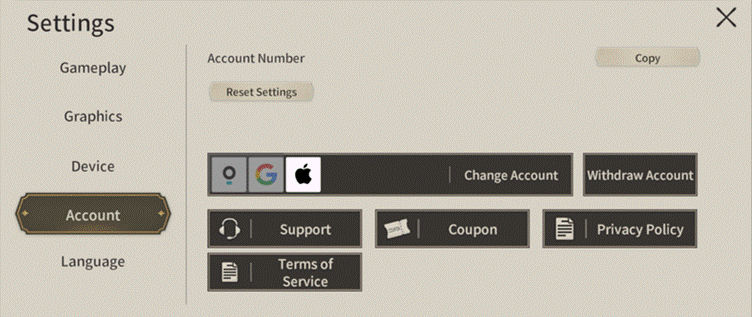
※ Icons for platforms that have been successfully linked will appear deactivated.
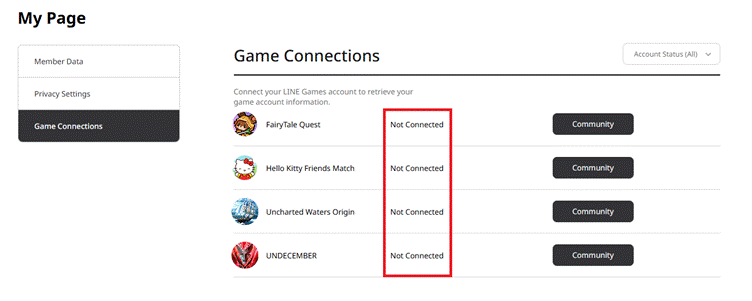
2) On the [LINE GAMES Official Website] → [My Page] → [Manage Linked Games],
the "Linked" status will be displayed to the right of each game title.
3. Notes
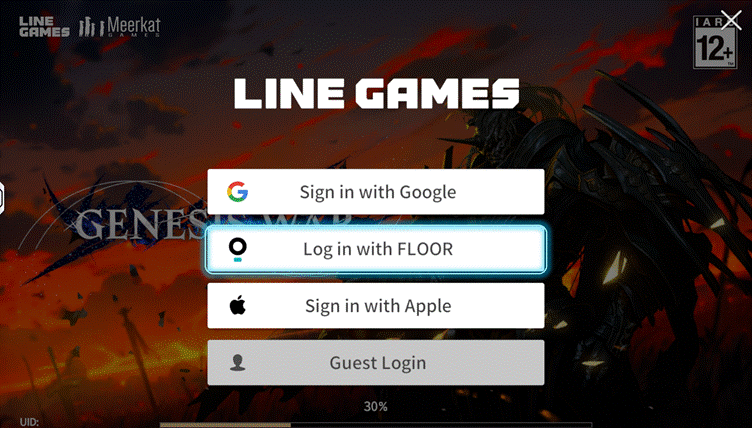
If you create and log in to a new FLOOR account via
[Switch Account] → [Login with FLOOR] on the initial title screen,
a brand-new Genesis War game account will be created.
Therefore, we only recommend this method for Guardians
who are playing Genesis War for the first time using a FLOOR account.
If you already have an existing character, please log in to the game as you normally would,
and then follow the steps in [1. How to Link Your Current Game Account to the FLOOR Platform]
of this guide to proceed with linking.
※ All images were captured in a test environment.
※ Actual in-game images may change depending on the update.

Move to the Login page?
Move to the login page?
두줄일떄 텍스트
등록한 상품 바로가기(링크)두줄일떄 텍스트
등록한 상품 바로가기(링크)두줄일떄 텍스트
등록한 상품 바로가기(링크)Your Game ID (NID) can be found in your game profile or settings.