





The Ultimate Tactical Saga Reborn, 『Genesis War』
Greetings, this is GM Azidahaka.
In Genesis War, growing your gear is one of the best ways to further boost your characters’ combat power.
This guide explains the core Gear Growth systems and how to use them,
so Guardians can strengthen their gear more efficiently and gain an edge in battle.
[Gear Level Up]
Just like character growth, you can level up gear to increase its performance.
Gear Level Up uses the “Blacksmith’s Hammer” item, and higher levels increase the gear’s base stats.
1. Gear Level Up can be done from the [Equipment] menu.

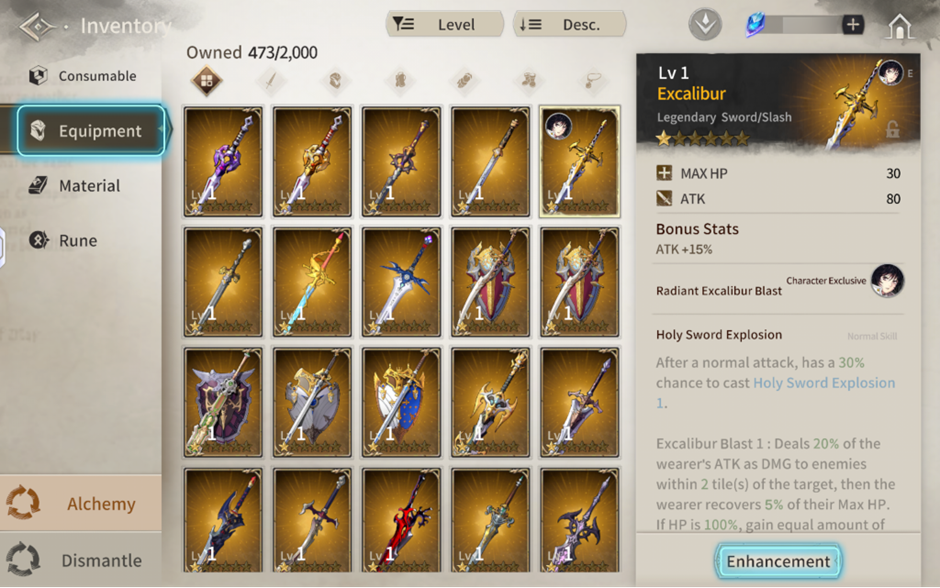
※ How to Access [Equipment]
Method 1)
: Lobby → [Character] → Select a Character → [Equipment] tab → Select Gear → [Enhancement]
Method 2)
: Lobby → [Inventory] → [Equipment] tab → Select Gear → [Enhancement]
2. On the Enhancement screen, check the required materials and costs, then proceed with Level Up.
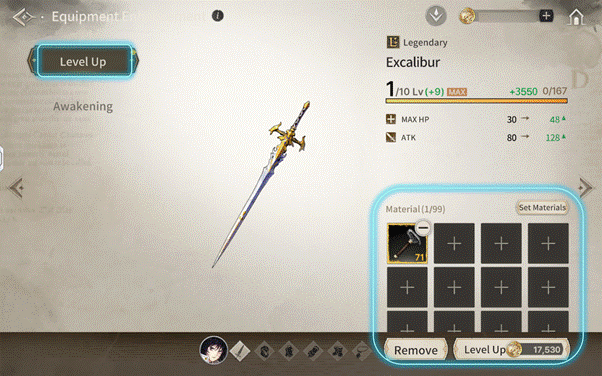
Leveling up gear improves your overall combat efficiency and helps your characters perform more consistently in battle.
[Gear Breakthrough]
Gear Breakthrough is a system that increases a gear’s growth limit by raising its maximum level cap.
All gear (including weapons and armor) has a level cap that increases in steps of 10.
Once your gear reaches its current max level, you can’t level it up further—until you perform a Breakthrough.
To perform a Breakthrough, you will consume required materials such as Whetstones, along with other resources.
1.Gear Breakthrough can be done from the [Equipment] menu.

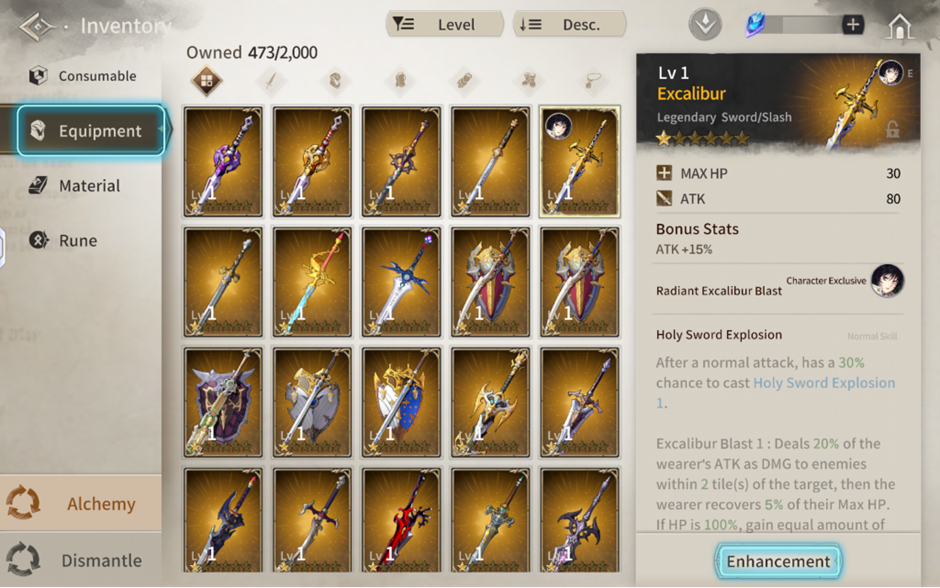
※How to Access [Enhancement]
Method 1)
: Lobby → [Character] → Select a Character → [Equipment] tab → Select Gear → [Enhancement]
Method 2)
: Lobby → [Inventory] → [Equipment] tab → Select Gear → [Enhancement]
2. On the Enhancement screen, check the required materials, then proceed with Breakthrough.
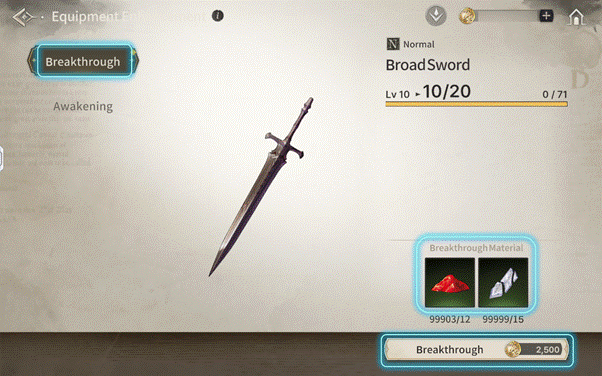
When you perform a Breakthrough, required materials and Eld will be consumed depending on the gear type.
Upon reaching a higher Breakthrough tier, the types of required materials will change.
Breakthrough materials can be obtained through various content, such as Imperial Army Raids, the Shop, and Missions.
※ Max Breakthrough Times by Gear Grade
- Common: 2 times
- Uncommon: 3 times
- Rare: 4 times
- Heroic / Legendary: 5 times
The maximum number of Breakthrough times differs by gear grade.
Additionally, for armor gear, a random option will be granted when you perform a Breakthrough.
[Awaken Gear]
Awakening is a system that brings out a gear’s latent potential.
You can increase the Awakening stage by using an identical piece of gear or substitute Awakening materials.
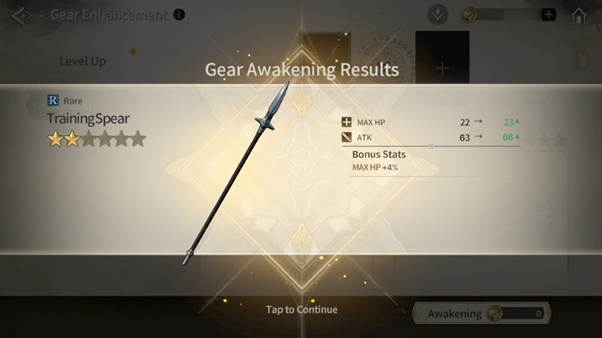
Awakening increases the gear’s stats.
For weapons, it also increases skill power.
Awaken Gear (Awakening) is available only for Rare, Heroic, and Legendary gear.
Common and Uncommon gear cannot be awakened.
※ Substitute Awakening Materials
- Orb of Illusion
- Tetrahedron of Illusion
- Polyhedron of Illusion
1. Awaken Gear can be done from the [Equipment] menu.

※ How to Access [Equipment]
Method 1)
: Lobby → [Character] → Select a Character → [Equipment] tab → Select Gear → [Enhancement]
Method 2)
: Lobby → [Inventory] → [Equipment] tab → Select Gear → [Enhancement]
2. On the Enhancement screen, check the required materials, then proceed with Awakening.
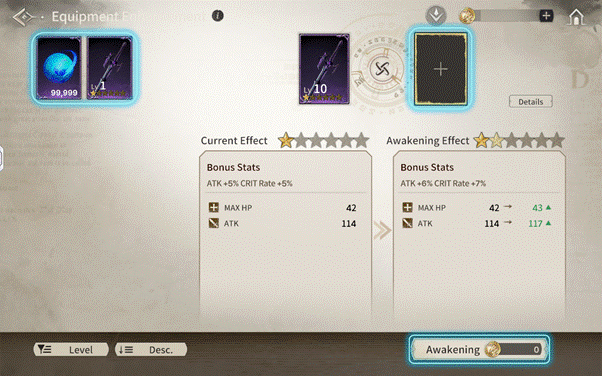
3. Once Awakening is complete, you can confirm the Bonus stats granted to the gear.
[Exclusive Weapons]
Exclusive Weapons are rare weapons that share a special bond with specific characters.
Their Character-Exclusive Skill is activated only when equipped by the designated character.
Equipping an Exclusive Weapon can enhance a character’s combat style and enable more specialized gameplay.
Please note: if an Exclusive Weapon is equipped by any character other than its designated owner, the Exclusive Skill will not activate.
[Modifications]
Modifications allow you to change the random options granted to armor after it has completed Breakthrough.
- Modifications can only be used on armor that has completed Breakthrough.
- Weapons are not eligible for Modifications.
To modify options, you need a Recombination Tool, which can be purchased from the Shop.
Only Rare, Heroic, and Legendarygrade Armor can be modified. Common and Uncommon armor are not eligible for modified.
1. Modifications can be accessed from the [Enhancement] menu.

※ How to Access Equipment Enhancement
Method 1)
: Lobby → [Character] → Select a Character → [Equipment] tab → Select Gear → [Enhancement]
Method 2)
: Lobby → [Inventory] → [Equipment] tab → Select Gear → [Enhancement]
2. On the Enhancement screen, check the required materials, then proceed with Modifications.
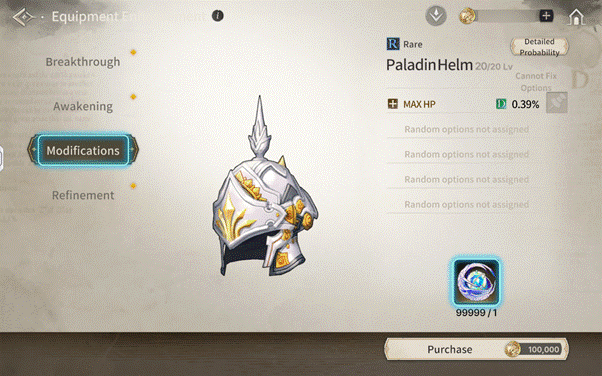
Only Rare-or-higher armor that has completed Breakthrough can be modified.
If your gear doesn’t meet the requirements, the Modifications tab will not be available.
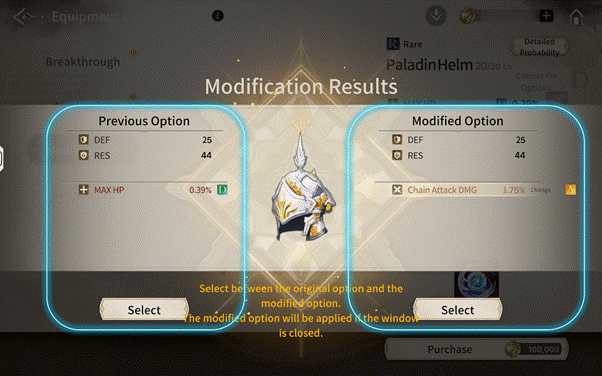
When modifying options, all random options except fixed options will be changed.
You can check the list of obtainable options from the [Detailed Probability] menu at the top.
3. On the result screen, choose either your existing options or the newly generated options to apply.
[Gear Refinement]
Gear Refinement further strengthens the values of random options gained through Breakthrough.
You can access Refinement from the [Refinement] menu on the Enhancement screen.
Eligibility:
- Rare grade or higher armor only
- Must be at Max Level
- Must have completed Breakthrough at least once
Each armor piece has its own Refinement Level, which can be raised up to Level 5.
As the Refinement Level increases, the bonus values of the armor’s random options increase.
(The exact increase may differ depending on gear grade, even at the same Refinement Level.)
※ You can check the increase values from the [Increase Level] menu at the top right.
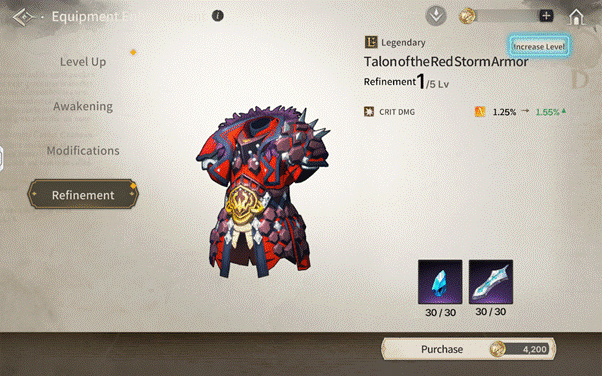
Random options obtained during Breakthrough are marked with grades A–D.
Refinement growth values vary depending on the option grade.
To proceed with Refinement, you will need Eld, Breakthrough materials, and Refinement Stones.
Depending on the armor type, one of the following will be consumed:
- Light Armor Refinement Stone
- Medium Armor Refinement Stone
- Heavy Armor Refinement Stone
Refinement Stones can be obtained through Machina War content.
The obtainable amount varies depending on Machina War difficulty.
[Alchemy]
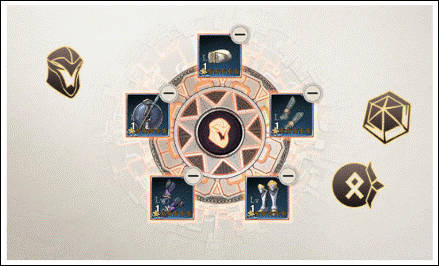
Through Alchemy, certain unused items can be converted into different items.
You can use the following as Alchemy materials:
- Gear
- Memory Fragments
- Runes
- Armor Shards
- Accessory Shards
Each Alchemy attempt normally consumes 5 materials.
However, some shard items consume a fixed amount:
- Armor Shards: consumes 150 of the same type
- Accessory Shards: consumes 500 of the same type
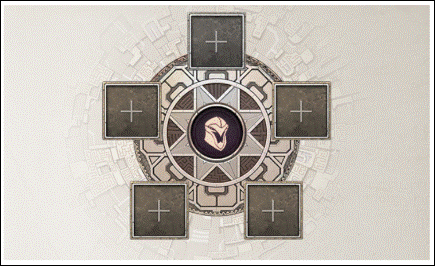
The items obtainable through Alchemy vary depending on the type and characteristics of the materials used.
Alchemy results are influenced by:
- Gear: Grade, Type, Subtype
- Memory Fragments: Grade, Element
- Runes: Grade, Theme, Slot
- Armor/Accessory Shards: Shard Type
Using higher-grade materials increases both:
- the chance of obtaining better items, and
- the expected reward grade.
On the other hand, including many low-grade items may result in lower-grade Alchemy outcomes.
For convenience, the Auto Alchemy feature is available.
[Auto Alchemy]
In the [Alchemy] tab, select the ‘Auto Alchemy’ button to open the Auto Alchemy popup and proceed more easily.
Auto Alchemy is available in the [Gear] and [Rune] tabs.
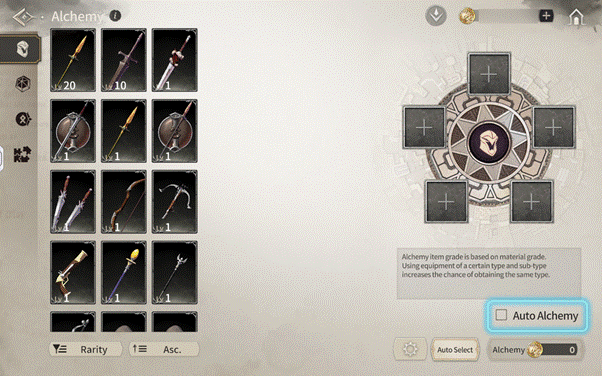
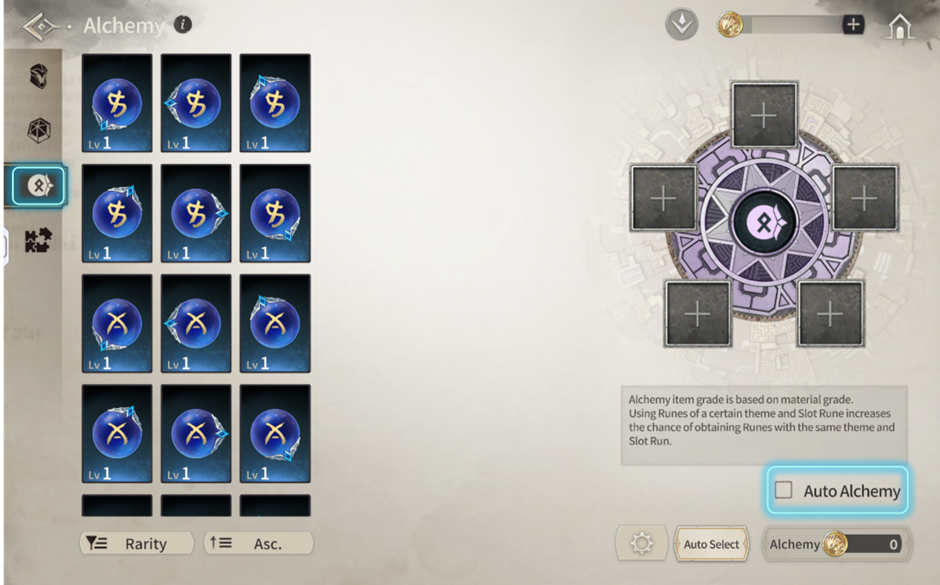
Rune Auto Alchemy lets you automatically select all runes that meet set conditions and perform Alchemy in one go.
Only items of Heroic grade or lower can be selected as Auto Alchemy materials.
For runes, only Rare and Heroic grade runes can be used.
※ All images in this notice were captured in a test environment.
※ Actual in-game images may change depending on the update.

Move to the Login page?
Move to the login page?
두줄일떄 텍스트
등록한 상품 바로가기(링크)두줄일떄 텍스트
등록한 상품 바로가기(링크)두줄일떄 텍스트
등록한 상품 바로가기(링크)Your Game ID (NID) can be found in your game profile or settings.