





The Ultimate Tactical Saga Reborn, 『Genesis War』
Greetings, this is GM Azidahaka.
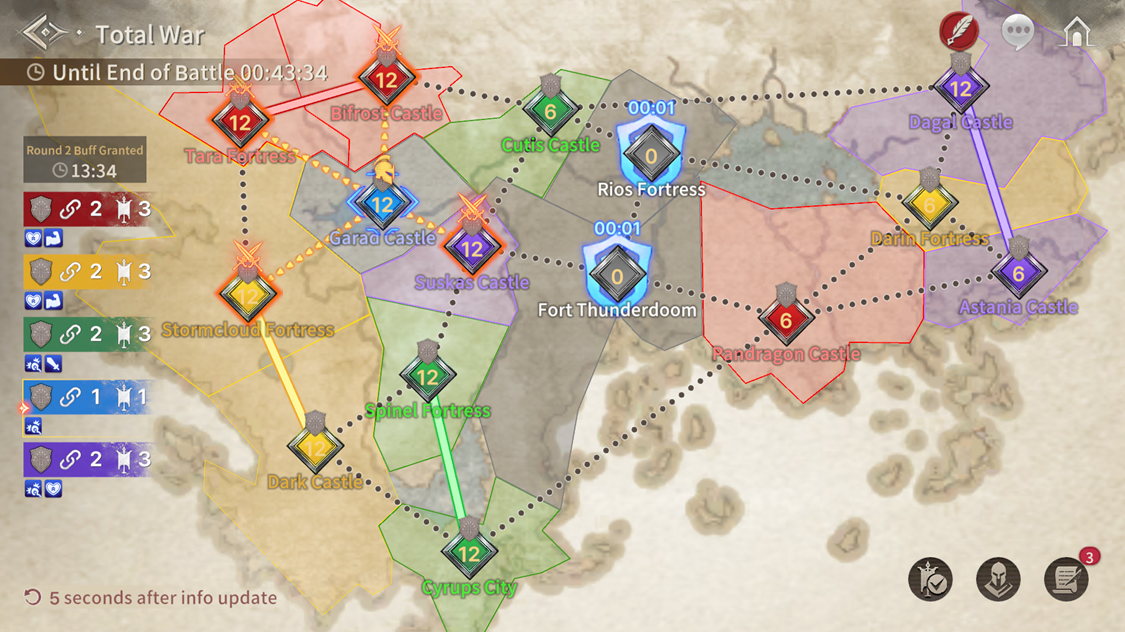
Total War is a battle mode where you join one of five Guilds and fight for dominance.
Claim more Territories and challenge yourself to become the victor of Antaria!
■ How to Play Total War
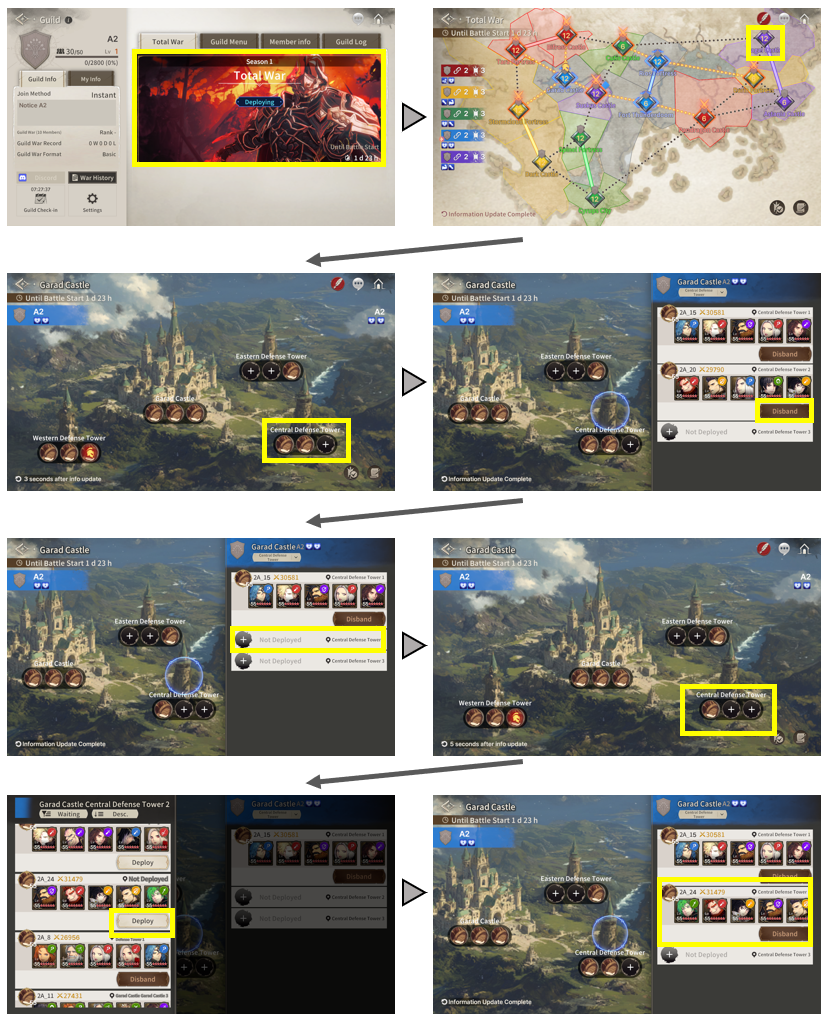
Enter [Total War] via the [Guild] tab.
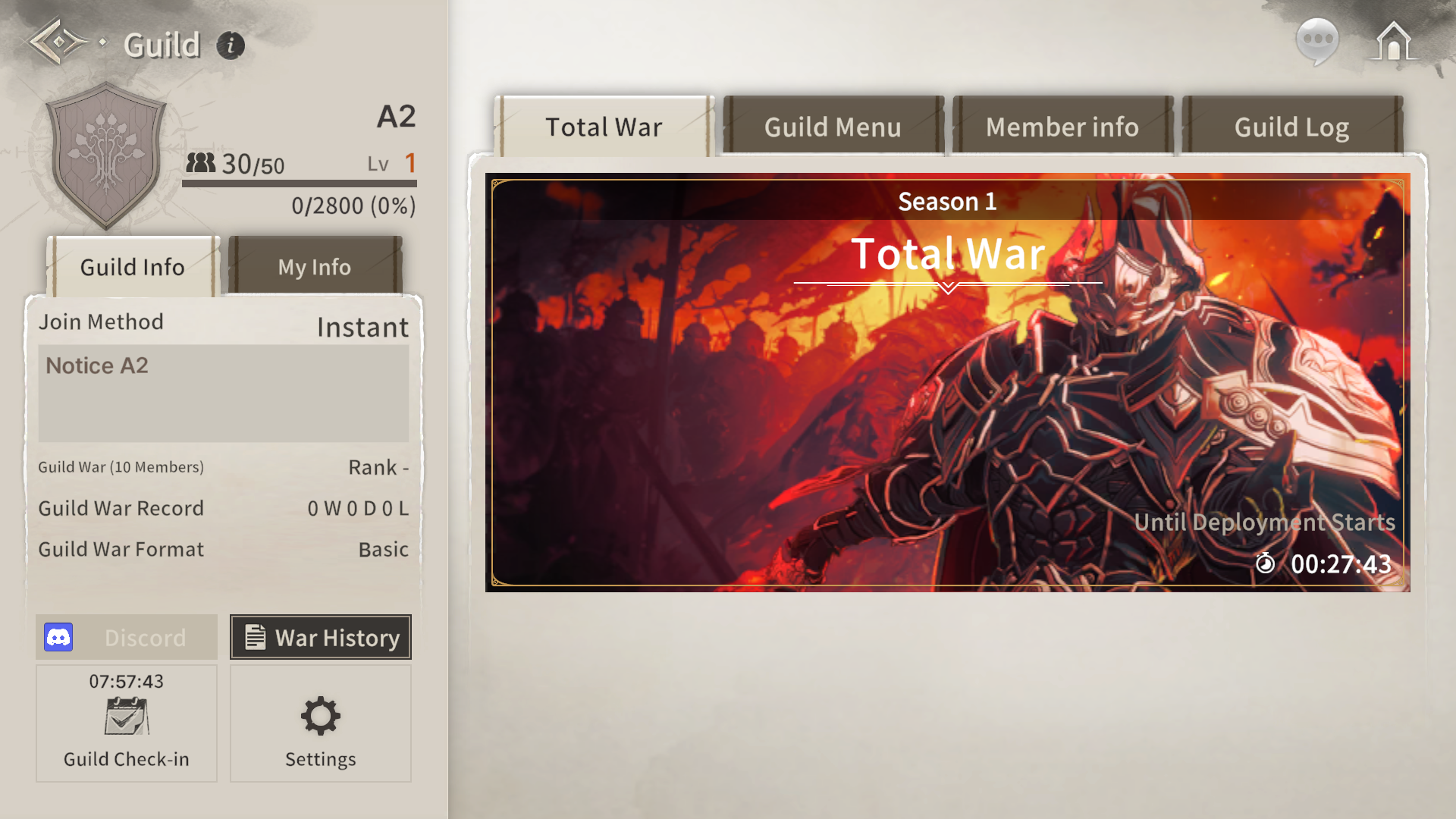
A Total War season lasts approximately one month, starting every two weeks on Friday at 12:00 (UTC) and running for 2 hours.
Each season consists of two battles, and once both battles conclude, the game transitions to the next season.
Total War is held in a 1:1:1:1:1 free-for-all format with a total of 5 Guilds participating. Guilds compete within the league based on the combined number of occupied Territories during the event, and rewards are distributed according to the final count of Territories held at the end of the season.
※ Total War is designed to proceed with 5 Guilds. Please note that if there are not enough eligible Guilds depending on matchmaking conditions, your Guild may be excluded from participation.
■ How to Register
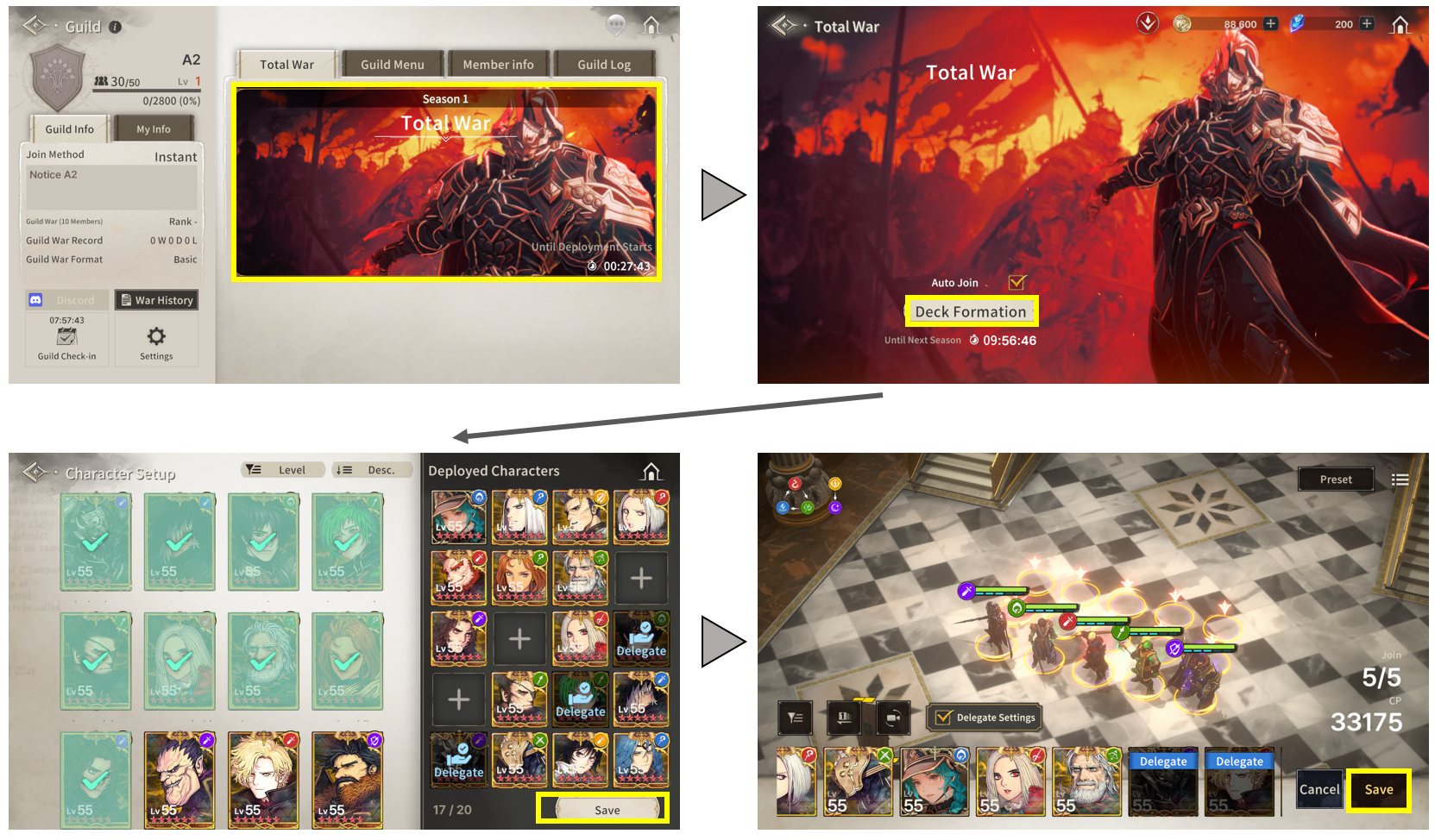
You can participate in Total War by setting up 20 characters and configuring one 5-character Defense Deck before the season begins and matchmaking takes place.
※ The stats of the 20 characters reflect their status at the time they were last saved before Total War matchmaking. If there are any updates or improvements to your characters' performance, please make sure to update and save them to the latest state.
※ You can delegate the authority to configure your defense deck to the Guild Leader or Vice Leader via the "Delegate Settings" option.
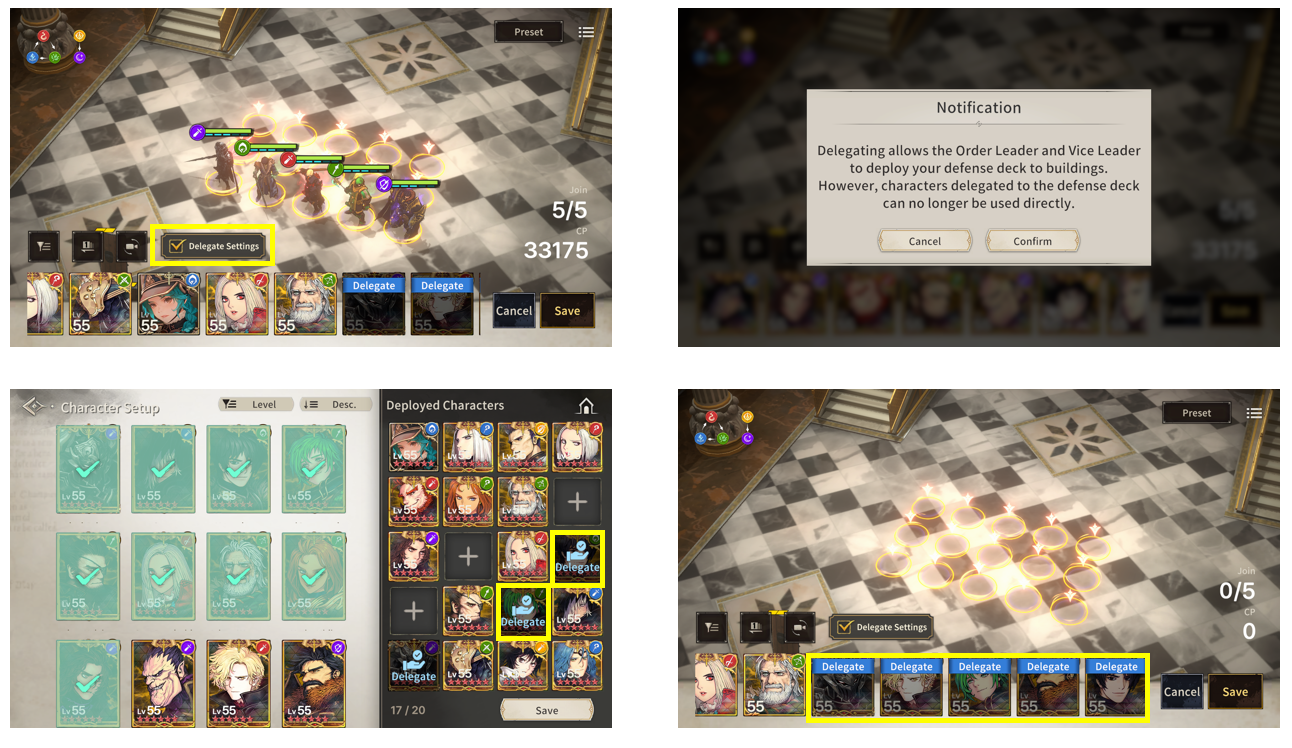
You can edit and save your participating characters and Defense Deck until matchmaking begins, and you will enter Total War with the data saved at the most recent point before the start.
When saving character data, all information except skill settings is snapshot and stored; therefore, equipment, class, runes, and other attributes cannot be modified during Total War battles, while skills remain adjustable.
■ Total War Matchmaking Rules
Guilds that participated in the 20-Player Guild War are assigned to leagues based on their ranking from the previous Guild War season.
Matchmaking within each league is conducted in groups of 5 Guilds according to their ranking. If fewer than 5 Guilds are available depending on matchmaking conditions, those remaining Guilds cannot participate in Total War.
Guilds that participated in the 10-Player Guild War are assigned to the Play League and will participate in Total War based on their 10-Player Guild War ranking.
[League Tiers]
League Tier | Classification Method |
Challenger League | Guilds ranked 1st–5th in the previous Guild War season |
Master League 1 | Guilds ranked 6th–10th in the previous Guild War season |
Master League 2 | Guilds ranked 11th–15th in the previous Guild War season |
Master League 3 | Guilds ranked 16th–20th in the previous Guild War season |
Diamond League 1 | Guilds ranked 21st–25th in the previous Guild War season |
Diamond League 2 | Guilds ranked 26th–30th in the previous Guild War season |
Diamond League 3 | Guilds ranked 31st–35th in the previous Guild War season |
Platinum League 1 | Guilds ranked 36th–40th in the previous Guild War season |
Platinum League 2 | Guilds ranked 41st–45th in the previous Guild War season |
Platinum League 3 | Guilds ranked 46th–50th in the previous Guild War season |
Play League | For ranks 51st and below from the previous Guild War season, groups are formed in brackets of 5 Guilds each. |
※ Please note that Total War is held in groups of 5 Guilds; depending on matchmaking conditions, if the number of eligible Guilds is insufficient to form a group, your Guild may be excluded from participation.
■ Defense Deck Character Retreat System
When a character assigned to a Defense Deck reaches 0 HP, that character will automatically retreat from the Defense Deck. Once automatically retreated, the character cannot participate in defense battles again until the Territory's battle history is reset or the Defense Deck is removed.
Furthermore, removal is not possible while a battle is in progress, meaning the current state will persist until the battle concludes.
Once a Territory enters a state with no battle history, all characters will be fully recovered; however, any victory penalties will remain in effect.
Additionally, characters that have retreated during battle are excluded from Combat Power calculations and will not contribute to the reflected actual Combat Power.
■ Battle Status Alert System
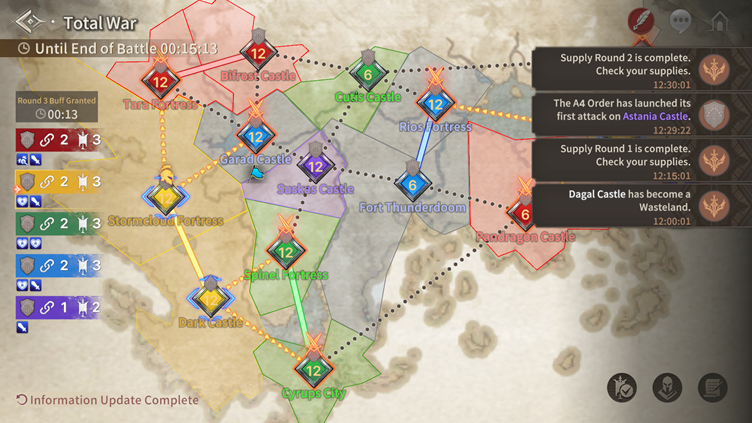
This system allows you to easily track the flow and changing dynamics of battle situations.
During key events such as Territory captures, updates are delivered as live notifications to all Guild members—beyond just a standard battle log—allowing you to grasp the tactical situation more intuitively.
[Trigger Conditions for Battle Status Alerts]
- When converted to Wasteland
- Upon completing Territory capture
- When the first battle begins
- Upon achieving 5 successful defenses (no separate alerts for 6th, 7th, etc.)
- When breaching a Defense Deck that has achieved 5 or more successful defenses
- Upon reward distribution and refresh
■ Defense Deck Deployment Period
Once Total War begins, there is a dedicated time period to deploy Defense Decks, during which the Guild Leader and Vice Leader can place Defense Decks before the battle starts.
Defense Decks are initially assigned automatically, and the Guild Leader and Vice Leader can manually adjust their placements.
■ Battle Start
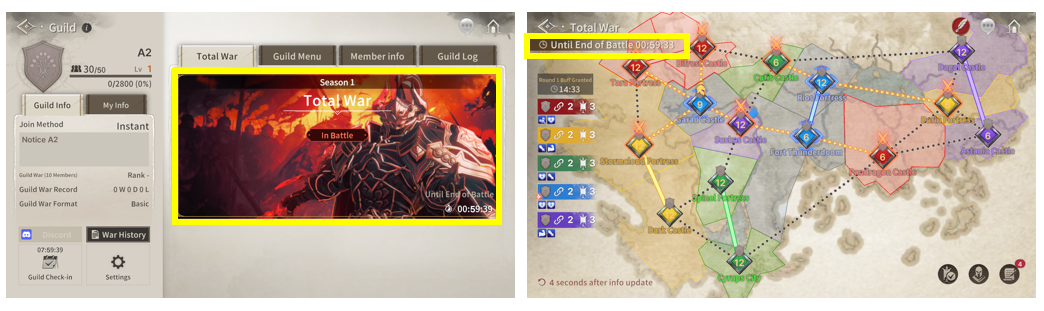
When the battle begins, the [In Battle] tag becomes active on the Total War UI.
Battles run for 2 hours. Members participating in Total War can enter as Players, while non-participants can enter as Spectators.
However, Spectators have restrictions on accessible information and available controls.
■ Attack Rules
To achieve victory in Total War, you must occupy more Territories than your opponents.
To claim more Territories, you must attack and conquer the Main Castle situated inside the opponent's Territory.
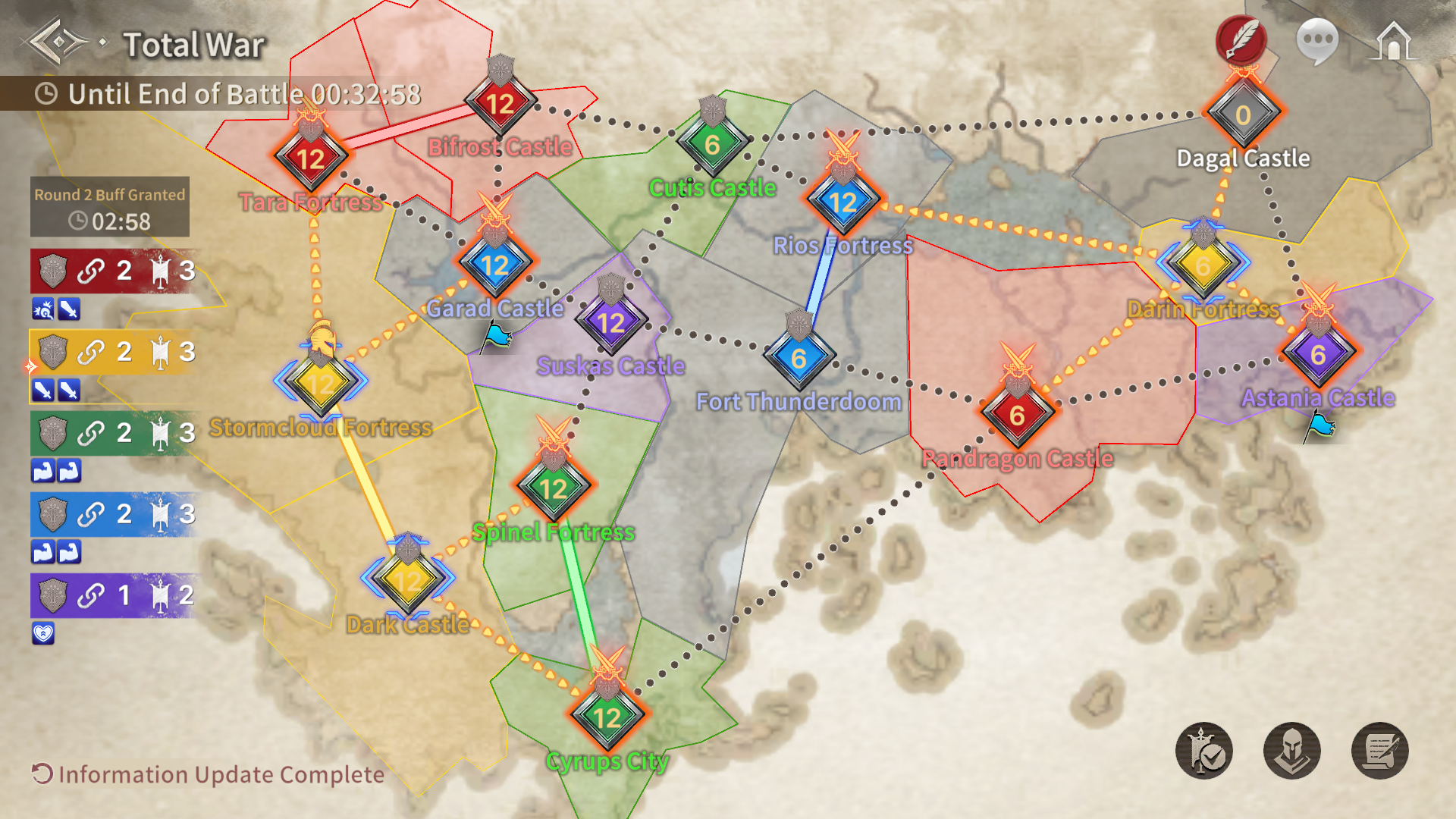
[How to Distinguish Between Attackable and Non-Attackable Territories]
You can attack other Guilds' Territories or Wastelands that are adjacent to the Territories currently held by your Guild.
※ The color indicating attack eligibility, the Guild stationed within the Territory, and the Guild's designated color all share the exact same color.
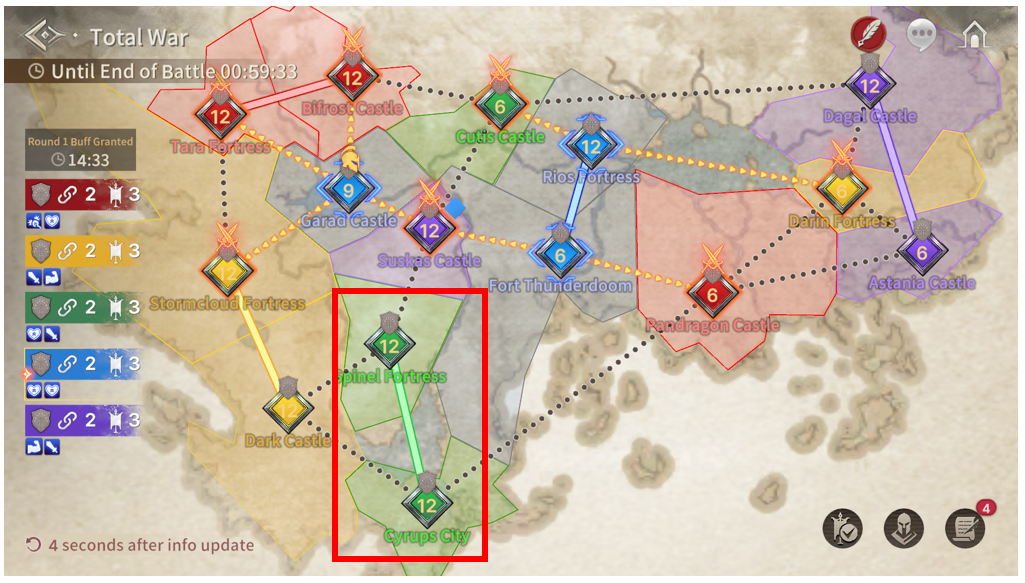
- Arrow Line: Attackable Territory
- Dotted Line: Non-Attackable Territory
- Connected Solid Line: Occupied Territory
A Guild that has lost all Territories can freely attack any Territory on the battle map.
However, the moment that Guild successfully captures a single Territory, this free-attack privilege ends immediately, and battle progress in all other Territories (aside from the newly captured one) is reset.
■ Attack Entry and Character Deployment Rules
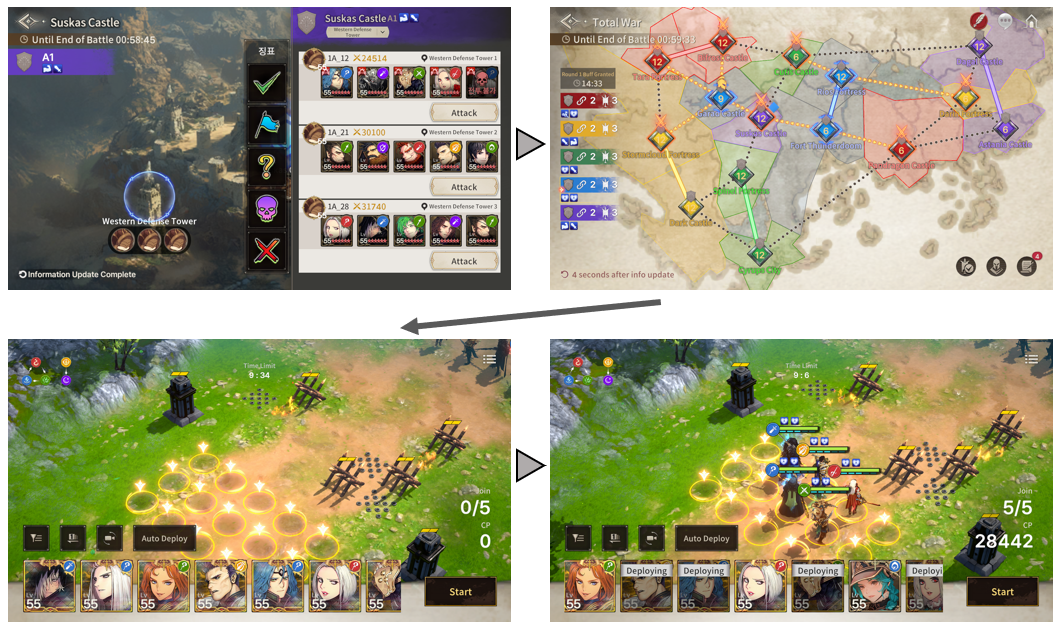
To initiate an attack, enter an attackable opponent's Territory and select a targetable building.
※ The moment you enter, it is considered an active "In Battle" state; if you forfeit without proceeding with the battle, 5 randomly selected characters will become unusable.
You must deploy 5 characters to launch an attack.
■ Battle Progress
Total War battles are conducted automatically, and battle speed can be adjusted up to 4x.
Upon winning a battle, the participating characters receive a "Victory Penalty."
The Victory Penalty stacks up to a maximum of Level 7, reducing the character's final damage dealt and maximum HP according to the penalty level.
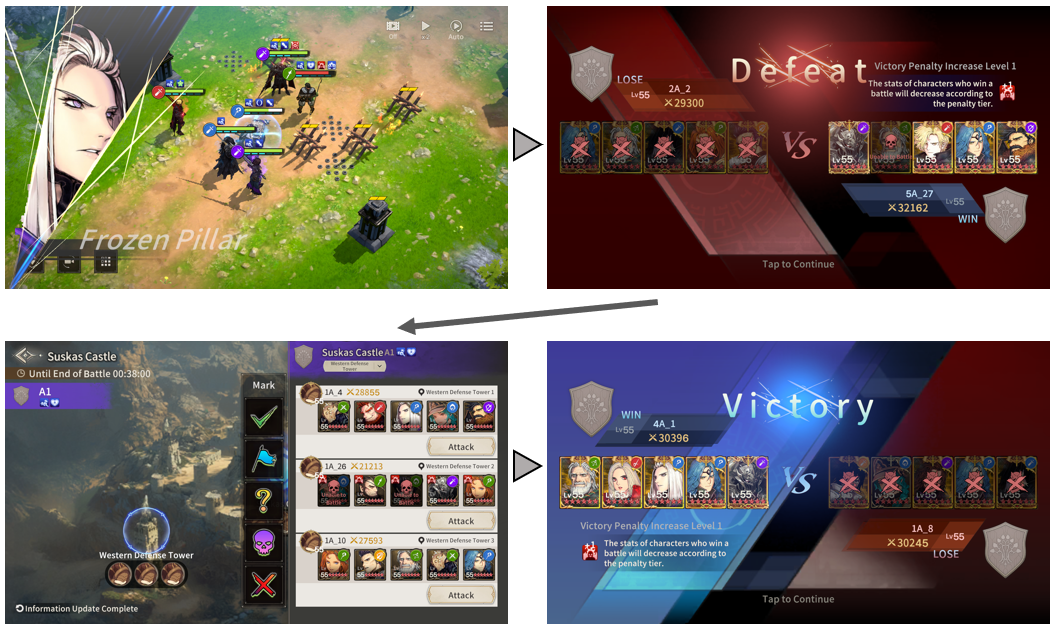
However, characters whose HP drops to 0 upon losing a battle are treated as retreated, and retreated characters cannot be used for the remainder of Total War.
[Victory Penalty Effects by Level]
Name | Effect Description |
Victory Penalty Tier 1 | Final DMG -5%, Max HP -5% |
Victory Penalty Tier 2 | Final DMG -10%, Max HP -10% |
Victory Penalty Tier 3 | Final DMG -15%, Max HP -15% |
Victory Penalty Tier 4 | Final DMG -20%, Max HP -20% |
Victory Penalty Tier 5 | Final DMG -30%, Max HP -25% |
Victory Penalty Tier 6 | Final DMG -40%, Max HP -30% |
Victory Penalty Tier 7 | Final DMG -50%, Max HP -40% |
■ Character Status
A character's UI display and availability conditions vary depending on battle results (victory/defeat) and Defense Deck assignment.
You can check a character's detailed status by selecting their icon from either the deployment list or the world map.
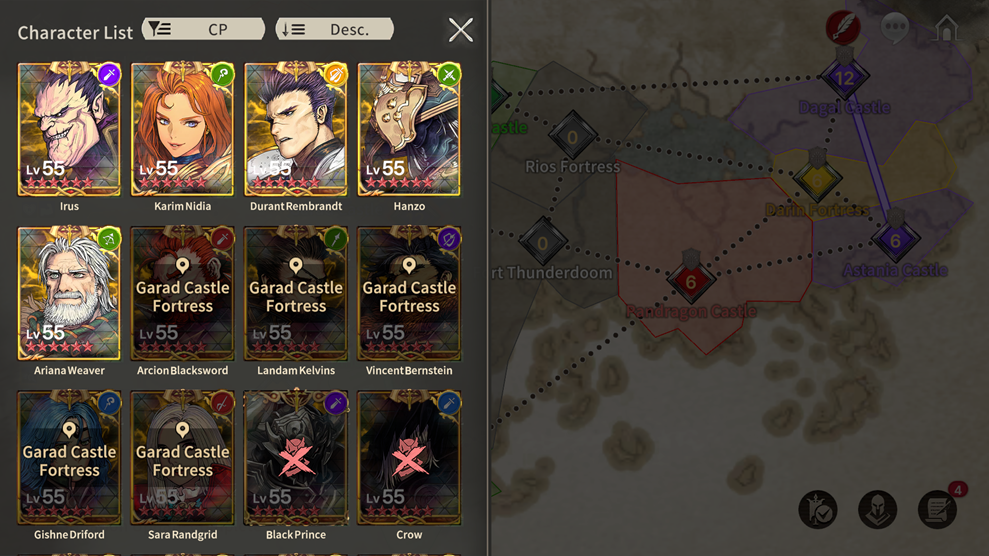
1) No Penalty
: The character can be used with their normal stats.
2) Victory Penalty Applied
: The character receives progressively harsher penalties based on the number of victories achieved in attack and defense battles. Characters with a Victory Penalty can continue to be used until they are defeated.
3) Assigned to Defense Deck
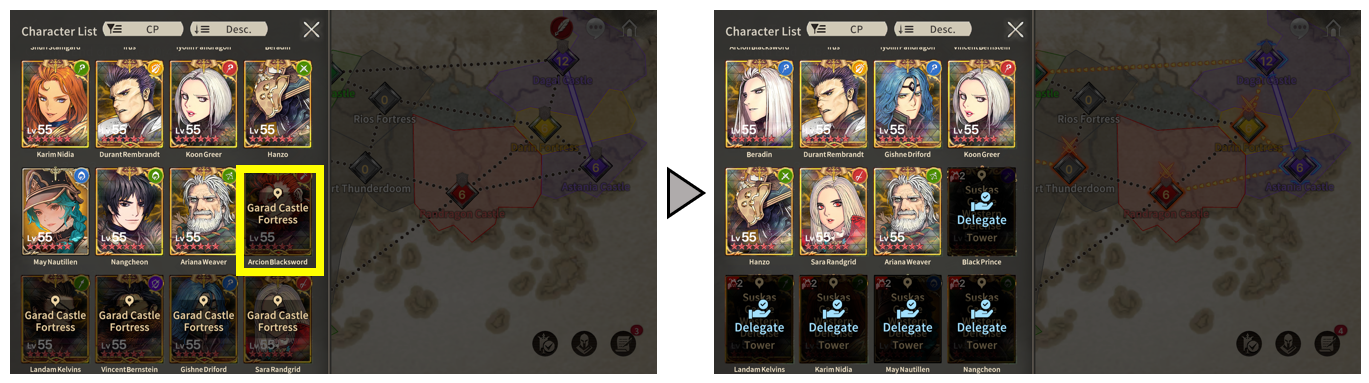
: Characters assigned to a Defense Deck cannot be used for attacks. However, they can be used again once removed from the Defense Deck. Selecting the portrait of a character set in a Defense Deck will navigate directly to their assigned Territory and building location.
4) Unusable
: Characters defeated in battle remain unusable until Total War ends.
■ Defense Deck Setup Rules
If a Territory owned by your Guild has no record of being attacked and has an available building where a Defense Deck can be placed, you can select 5 characters to set up a Defense Deck.
※ If you assign a character without equipped gear or runes to a deck, an unequipped warning alert will be displayed.
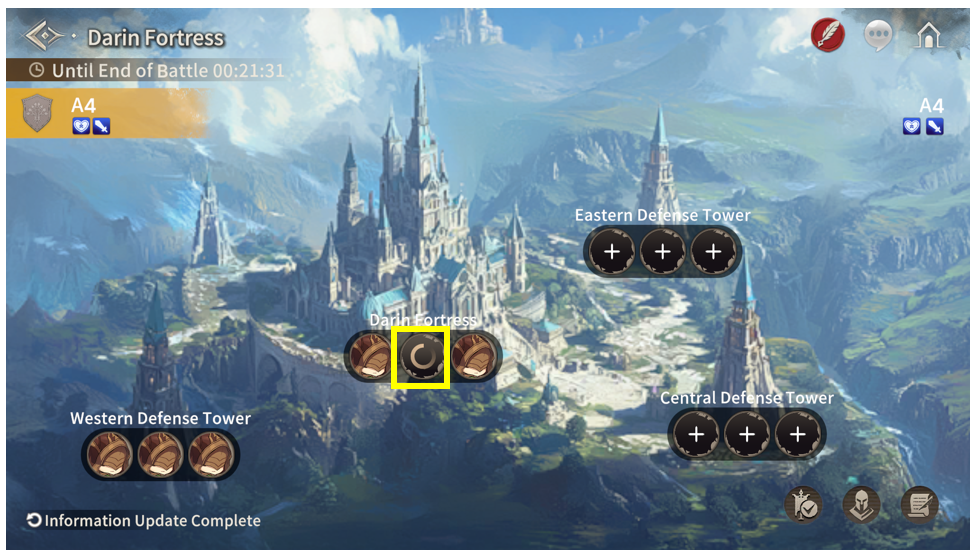
If at least one Defense Deck is not deployed to the "Main Castle," that Territory will turn into a Wasteland and enter a 1-minute Territory Protection period.
※ When outside the Wasteland Protection period, a Wasteland belongs to whichever Guild sets up a Defense Deck first.
■ Defense Deck Disbandment Rules
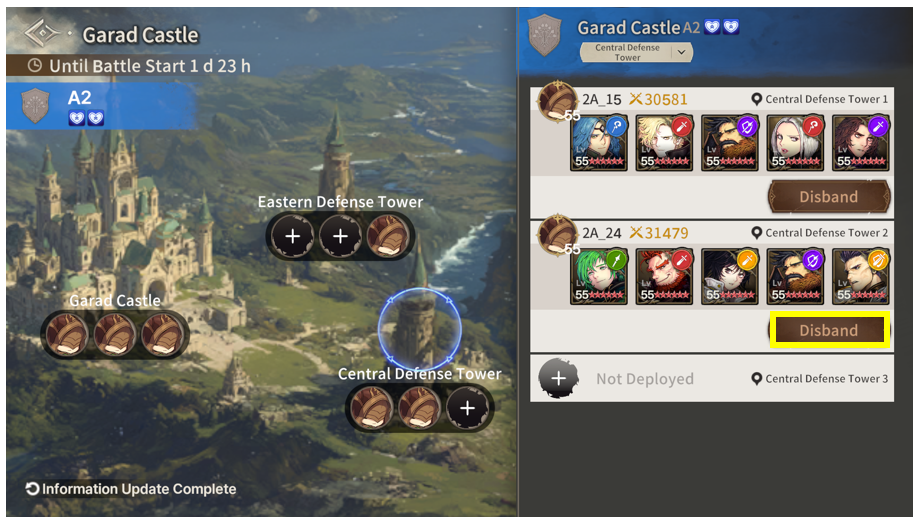
A Defense Deck can be disbanded under the following conditions:
1. The Territory belongs to your Guild:
- Regular members can only disband Defense Decks they deployed themselves.
- The Guild Leader and Vice Leader can disband any deployed Defense Deck within their Guild.
2. The Defense Deck can only be disbanded if the Territory has no record of being attacked.
3. Once a Defense Deck is disbanded, the corresponding characters can be used for attacks or reassigned to a Defense Deck in a new location.
■ Territory Capture
A Territory is awarded to the Guild that captures its Main Castle.
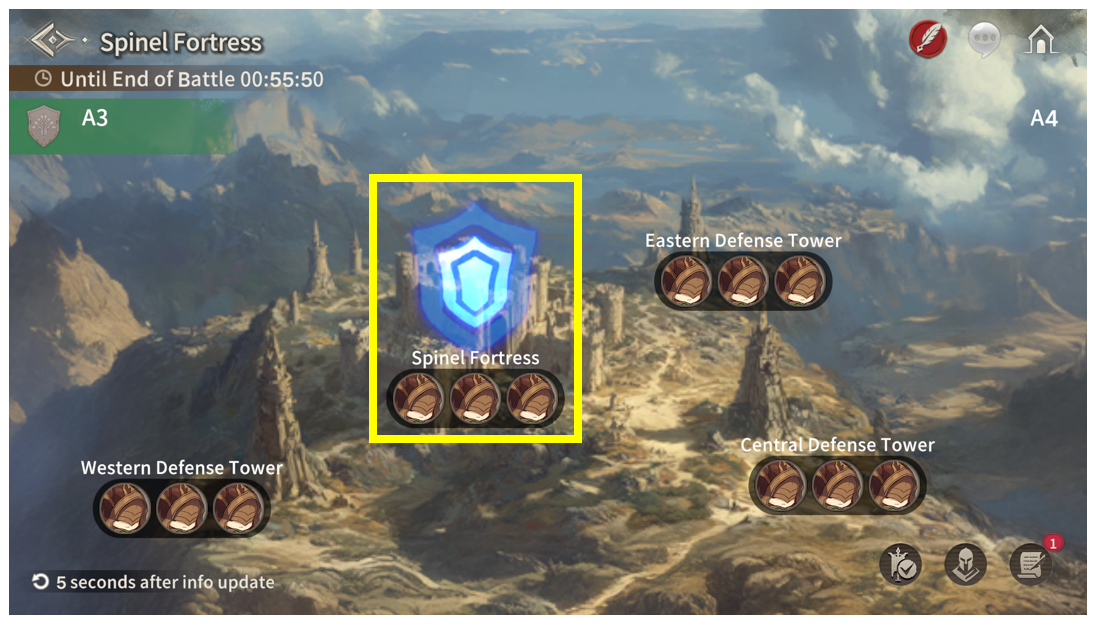
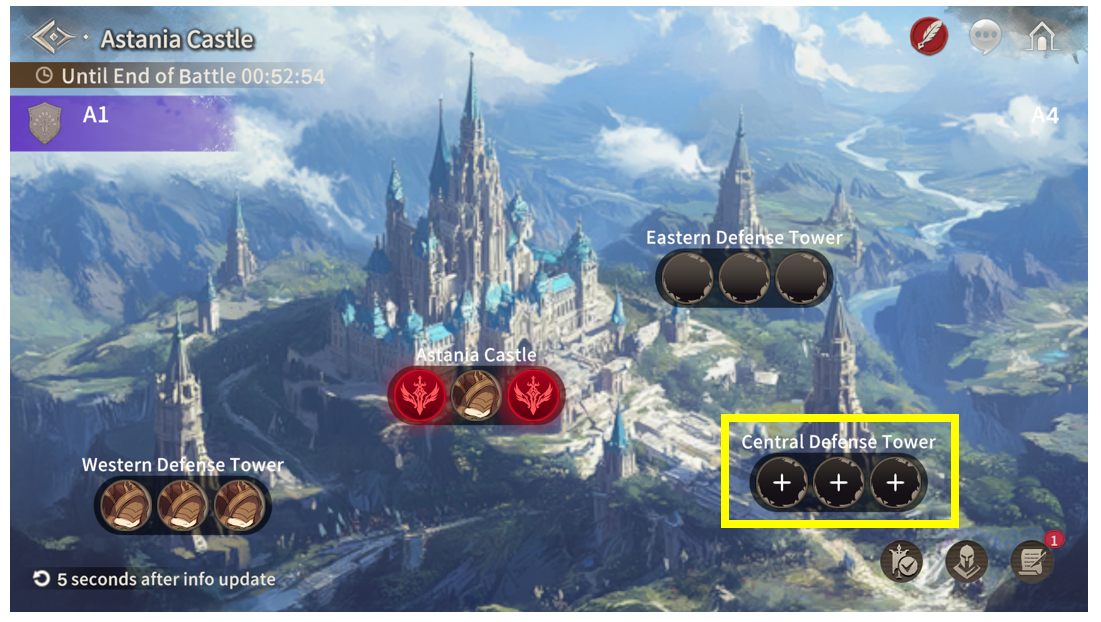
However, to launch an attack on the Main Castle, your Guild must occupy at least one Defense Tower within that Territory.
1) Unable to attack the Main Castle due to no Defense Towers captured
2) Able to attack the Main Castle, as Guild A has captured a Defense Tower
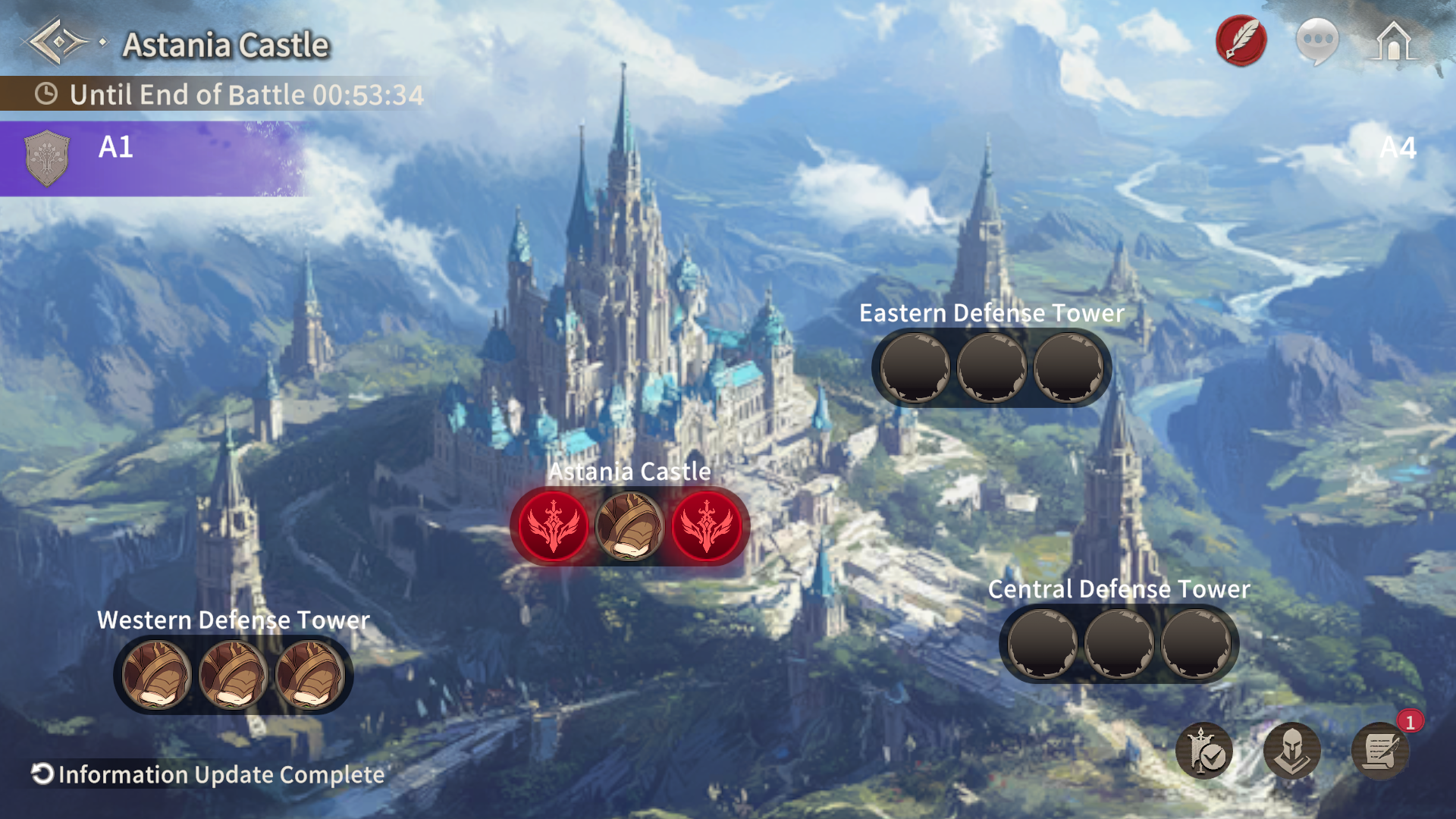
3) Able to attack the Main Castle immediately, as the defending Guild B has not deployed any Defense Decks
※ At least one Defense Deck must be deployed.
■ Building Occupation
If an attacking Guild occupies 2 or more of the Defense Decks stationed at a Defense Tower or the Main Castle, that building enters an Occupied state. The remaining Defense Decks in that building can then only be attacked by the Guild that holds occupation.
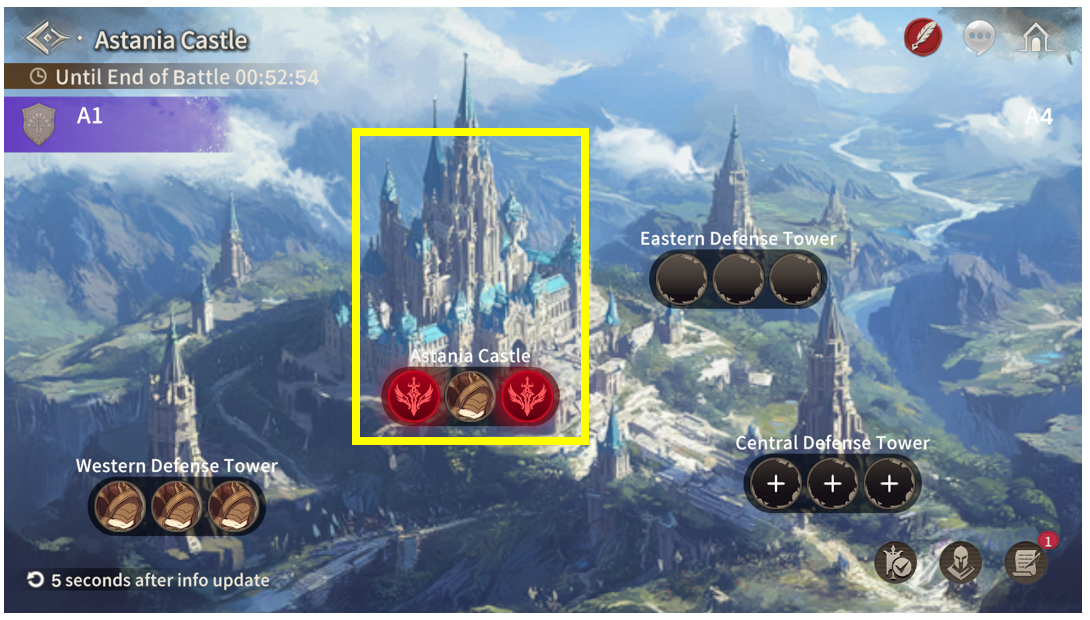
However, if an even number of Defense Decks are deployed, the outcome is determined as follows:
- Defense Tower: If different Guilds each defeat and occupy 1 Defense Deck, both Guilds can attack the Main Castle together.
- Main Castle: If different Guilds each defeat and occupy 1 Defense Deck, the Territory becomes a Wasteland.
■ Battle Status
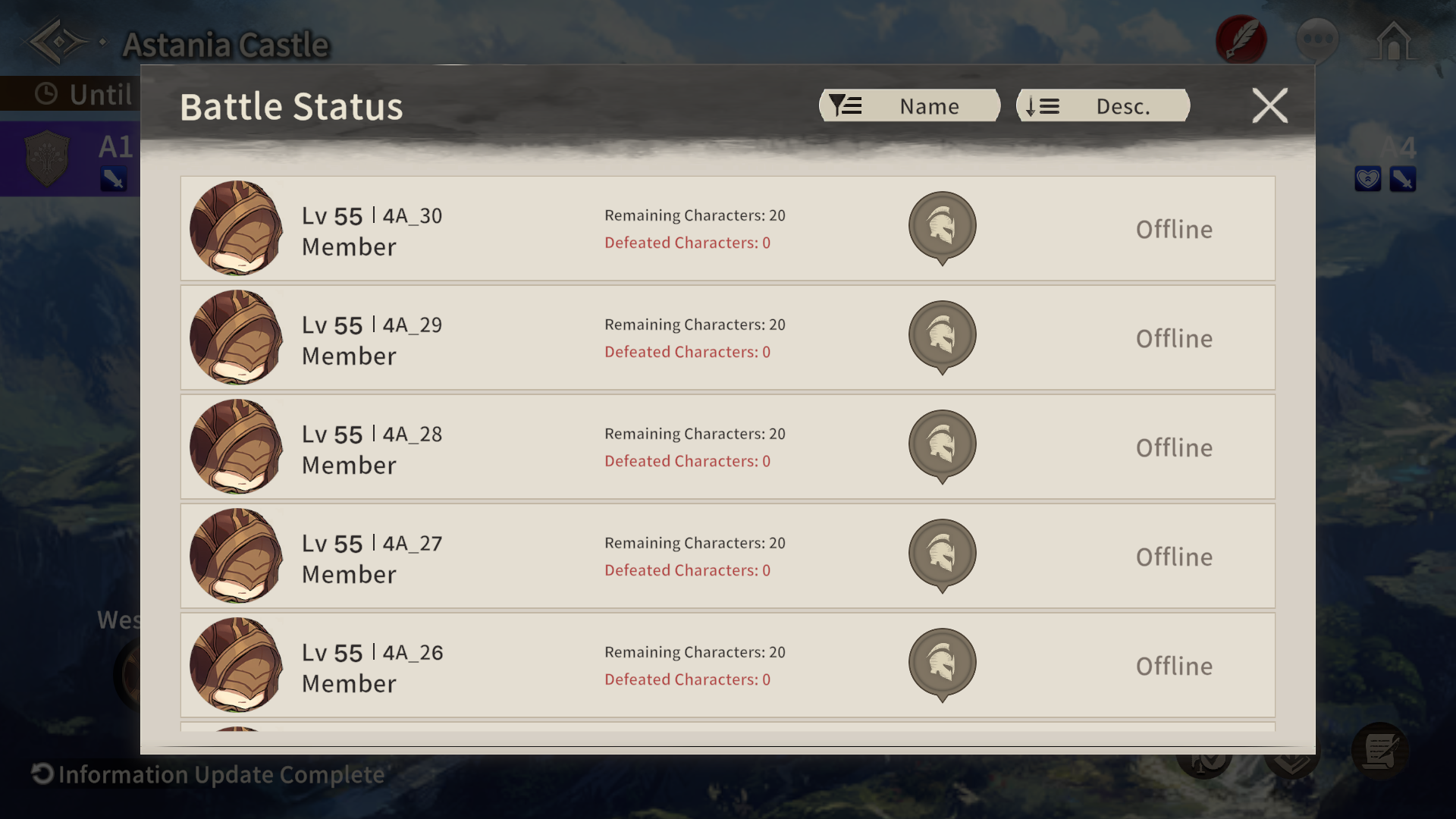
You can check the real-time status of participating Guild members on the Battle Status board. Selecting a deployed Defense Deck will immediately navigate you to its location.
■ Marker Usage
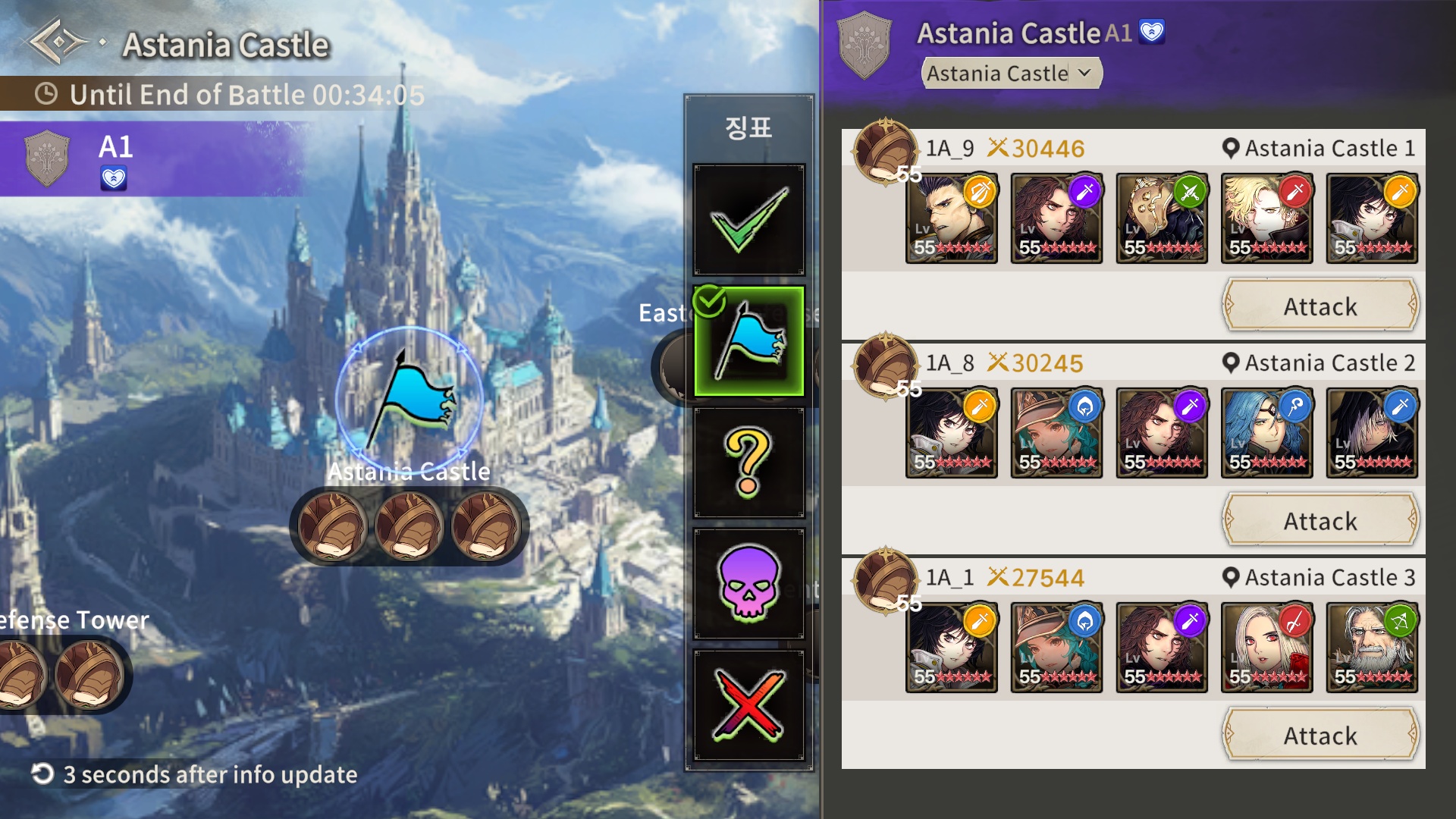
To facilitate Guild communication, the Guild Leader and Vice Leader can place Markers.
Once set, Markers appear on the targeted building and its corresponding Territory on the world map. Duplicate Markers cannot be placed on the same defensive building.
■ Supply System
The Supply System grants more buffs the more Territories your Guild connects.
Supplies are distributed at 15-minute intervals. At the exact moment buffs are granted, the number of buffs awarded is determined by the maximum number of connected Territories.
Furthermore, because Supply buffs are granted randomly, we recommend deploying and utilizing your characters strategically according to your active Supply buff status.
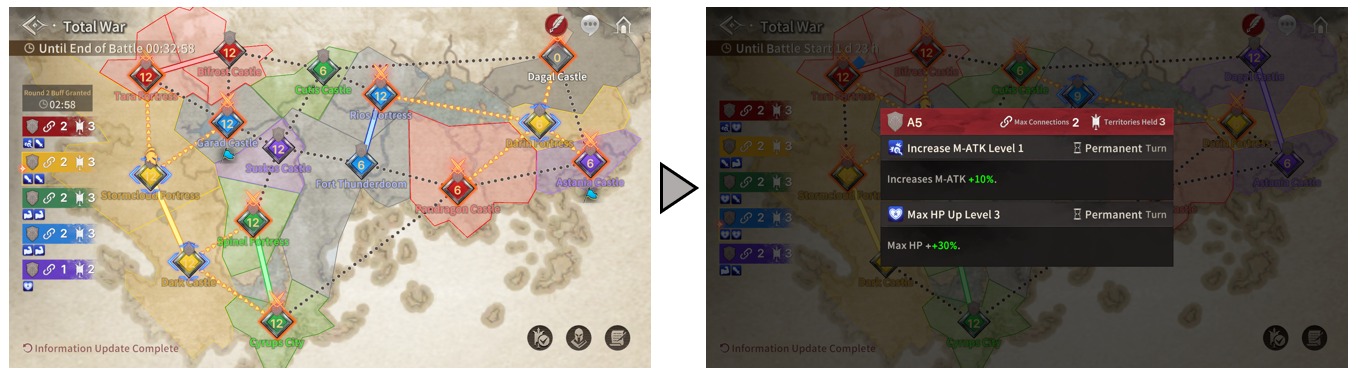
1) The more connected Territories your Guild holds at the time of Supply, the greater the number of buffs received.
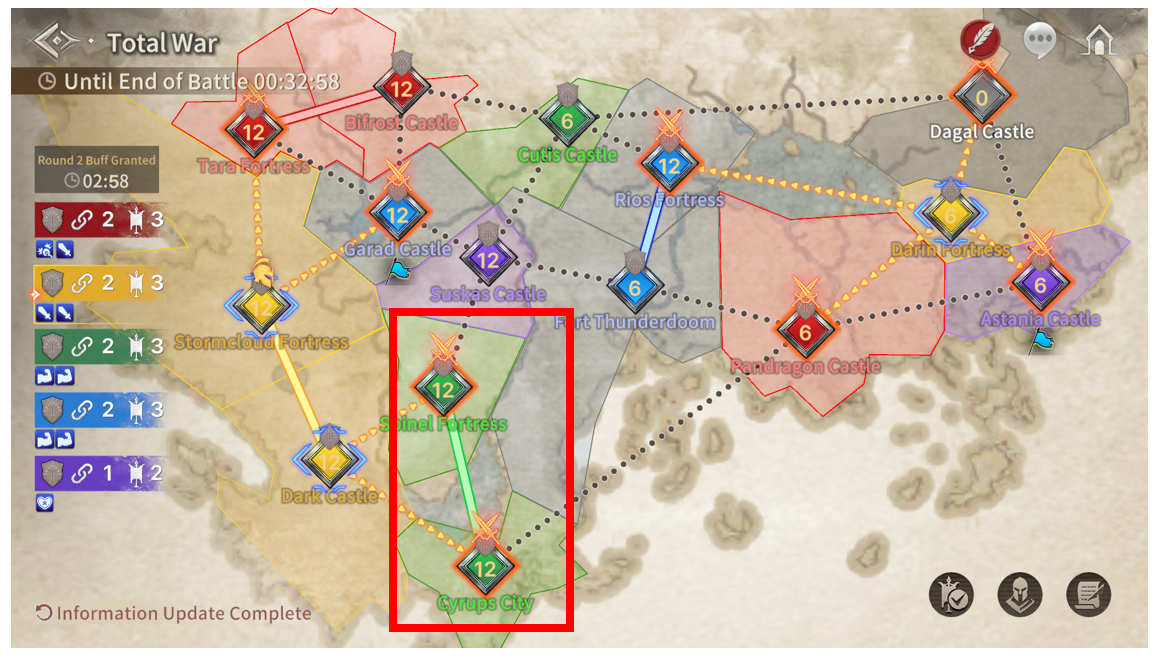
[Number of Buffs Acquired by Connected Territories]
Connected Territories | Buff Count |
0–1 Territories | 1 Buff |
2–3 Territories | 2 Buffs |
4–7 Territories | 3 Buffs |
8–10 Territories | 4 Buffs |
11–15 Territories | 5 Buffs |
■ Supply Buff List
Buff Name | Effect Description |
ATK/M-ATK Increase Lv. 1 | Increases ATK/M-ATK by 5% |
ATK/M-ATK Increase Lv. 2 | Increases ATK/M-ATK by 10% |
ATK/M-ATK Increase Lv. 3 | Increases ATK/M-ATK by 15% |
ATK/M-ATK Increase Lv. 4 | Increases ATK/M-ATK by 20% |
ATK/M-ATK Increase Lv. 5 | Increases ATK/M-ATK by 25% |
ATK/M-ATK Increase Lv. 6 | Increases ATK/M-ATK by 30% |
ATK/M-ATK Increase Lv. 7 | Increases ATK/M-ATK by 35% |
ATK/M-ATK Increase Lv. 8 | Increases ATK/M-ATK by 40% |
ATK/M-ATK Increase Lv. 9 | Increases ATK/M-ATK by 45% |
ATK/M-ATK Increase Lv. 10 | Increases ATK/M-ATK by 50% |
ATK Increase Lv. 1 | Increases ATK by 5% |
ATK Increase Lv. 2 | Increases ATK by 10% |
ATK Increase Lv. 3 | Increases ATK by 15% |
ATK Increase Lv. 4 | Increases ATK by 20% |
ATK Increase Lv. 5 | Increases ATK by 25% |
ATK Increase Lv. 6 | Increases ATK by 30% |
ATK Increase Lv. 7 | Increases ATK by 35% |
ATK Increase Lv. 8 | Increases ATK by 40% |
ATK Increase Lv. 9 | Increases ATK by 45% |
ATK Increase Lv. 10 | Increases ATK by 50% |
M-ATK Increase Lv. 1 | Increases M-ATK by 10% |
M-ATK Increase Lv. 2 | Increases M-ATK by 20% |
M-ATK Increase Lv. 3 | Increases M-ATK by 30% |
M-ATK Increase Lv. 4 | Increases M-ATK by 40% |
M-ATK Increase Lv. 5 | Increases M-ATK by 50% |
M-ATK Increase Lv. 6 | Increases M-ATK by 60% |
M-ATK Increase Lv. 7 | Increases M-ATK by 70% |
M-ATK Increase Lv. 8 | Increases M-ATK by 80% |
M-ATK Increase Lv. 9 | Increases M-ATK by 90% |
M-ATK Increase Lv. 10 | Increases M-ATK by 100% |
Max HP Increase Lv. 1 | Increases Max HP by 10% |
Max HP Increase Lv. 2 | Increases Max HP by 20% |
Max HP Increase Lv. 3 | Increases Max HP by 30% |
Max HP Increase Lv. 4 | Increases Max HP by 40% |
Max HP Increase Lv. 5 | Increases Max HP by 50% |
Max HP Increase Lv. 6 | Increases Max HP by 60% |
Max HP Increase Lv. 7 | Increases Max HP by 70% |
Max HP Increase Lv. 8 | Increases Max HP by 80% |
Max HP Increase Lv. 9 | Increases Max HP by 90% |
Max HP Increase Lv. 10 | Increases Max HP by 100% |
■ Total War Rewards
Players can earn Season Honor Rewards, Season Rewards, and Participation Rewards.
All rewards are distributed on the season results screen after the season ends.
[Season Honor Rewards]
After the season ends, a Guild Frame is awarded according to the Guild's league rank. The Guild Frame can be viewed in the Guild UI.
[Season Rewards]
After the season ends, the total number of Territories held from Total War battles is tallied to award Valor Medals, the dedicated Total War currency.
Season Rewards are distributed to all Guild members once the season concludes.
Captured Territories | Valor Medal |
30 | 3000 |
29 | 2950 |
28 | 2900 |
27 | 2850 |
26 | 2800 |
25 | 2750 |
24 | 2700 |
23 | 2650 |
22 | 2600 |
21 | 2550 |
20 | 2500 |
19 | 2400 |
18 | 2300 |
17 | 2200 |
16 | 2100 |
15 | 2000 |
14 | 1900 |
13 | 1800 |
12 | 1700 |
11 | 1600 |
10 | 1500 |
9 | 1400 |
8 | 1300 |
7 | 1200 |
6 | 1100 |
5 | 1000 |
4 | 900 |
3 | 800 |
2 | 700 |
1 | 600 |
0 | 0 |
[Participation Rewards]
Upon the conclusion of each Total War match, Total War Chests and dedicated Total War coins (Valor Medals) are awarded based on your individual accumulated participation score.
Type | Record Name | Earned Score |
Attack | Attack Victory | 150 |
Attack Defeat | 150 | |
Defense | Defense Victory | 150 |
Defense Victory | 150 |
Individual Performance Score | Obtainable Valor Medals | ||||
Challenger League | Master League | Diamond League | Platinum League | Play League | |
1 ~ 100 | 500 | 400 | 300 | 250 | 200 |
101 ~ 150 | 700 | 600 | 500 | 350 | 300 |
151 ~ 200 | 1000 | 800 | 700 | 450 | 400 |
201 ~ 250 | 1400 | 1000 | 900 | 600 | 500 |
251 ~ 300 | 1700 | 1300 | 1100 | 750 | 600 |
301 ~ 350 | 2000 | 1600 | 1300 | 900 | 700 |
351 ~ 400 | 2300 | 1900 | 1500 | 1050 | 800 |
401 ~ 450 | 2600 | 2100 | 1700 | 1200 | 900 |
451 ~ 500 | 2800 | 2300 | 1850 | 1350 | 1000 |
500 ~ 600 | 3000 | 2500 | 2000 | 1500 | 1100 |
600 ~ 700 | 3150 | 2750 | 2150 | 1750 | 1200 |
700 ~ 800 | 3300 | 2800 | 2300 | 1800 | 1300 |
800 ~ 900 | 3400 | 2900 | 2400 | 1900 | 1400 |
900 ~ 1000 | 3500 | 3000 | 2500 | 2000 | 1500 |
■ Total War Shop
You can exchange Valor Medals earned through Total War for various items under [Guild Shop] - [Valor Medal].
Item | Purchase Limit | Price (Valor Medal) |
Special Accessory Box*1 | 1 per month | 16,000 |
Lucky Accessory Box*1 | 2 per month | 1,000 |
Laznite*20 | 1 per month | 6,000 |
Destiny Cube*10 | 2 per month | 2,000 |
Omni Cube*10 | 2 per month | 2,000 |
Golden Weapon Box*1 | 2 per month | 800 |
Golden Armor Box*1 | 4 per month | 200 |
Reforge Tool*1 | 5 per week | 200 |
Primordial Stone II*1 | 20 per week | 50 |
※ Special Accessory Chests and Lucky Accessory Chests offer a chance to obtain Legendary accessories at random rates, though some accessories are excluded. (Black Flag, Time Compass, etc. excluded)
■ Total War Season End
After the season ends, you can check participating Guild information, season rankings, number of Territories held, and number of connected Territories.
Thank you.
※ All images in this notice were taken in a test environment.
※ Images may be subject to change depending on the update progress.
※ This document was drafted with the assistance of translation tools.

Move to the Login page?
Move to the login page?
두줄일떄 텍스트
등록한 상품 바로가기(링크)두줄일떄 텍스트
등록한 상품 바로가기(링크)두줄일떄 텍스트
등록한 상품 바로가기(링크)Your Game ID (NID) can be found in your game profile or settings.